Back to Training Library
CPI • Community Procurement Independent

The Community's Buying Journey

How an HOA board or community manager runs a high-dollar procurement — from the first need to a verified award. Ten stages, every screen, and one honest rule throughout: the community chooses on capability, never on who pays.

Listen along

Prefer to listen? Play the full guide read aloud.

This playbook follows one community all the way through a real procurement: from noticing a contract is due, to building the request, to comparing verified vendors, to a decision the board can defend. You'll see every screen and exactly who does what — the board or manager, CPI's prefill and matching engine, and the independent verifier. Throughout, one rule never bends: nobody pays to win.

About the screens. The screenshots in this guide are captured on the real platform using a demonstration community, Palmetto Lakes HOA — illustrative data, not a real association. Dollar figures are examples.

The journey at a glance

Ten stages carry a community from “we have a contract due” to “we chose the most capable vendor, and here is the proof.”

1

Sign in and see where your community stands

In the driver’s seat: the board member or community association manager (CAM)

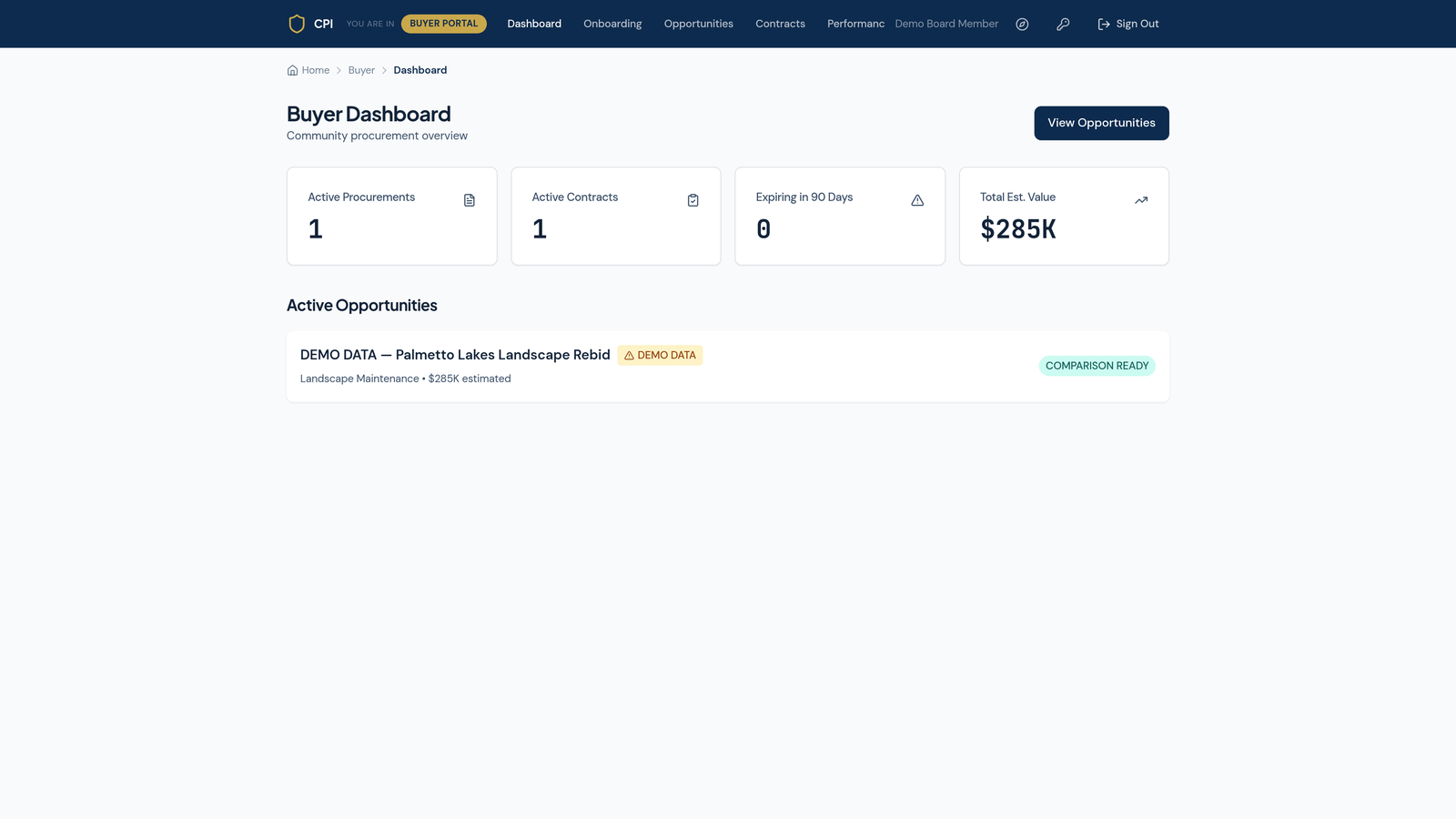
Every community’s buying starts on one screen — the Buyer Dashboard. In a single glance the board sees how many procurements are active, how many contracts are running, what is expiring in the next ninety days, and the total dollar value under management.

In this walk-through the community is Palmetto Lakes HOA — demonstration data, not a real association — with one active procurement worth an estimated $285K. Anything a board is likely to let slip (a contract quietly expiring, a rebid coming due) is surfaced here before it becomes a scramble.

The Buyer Dashboard showing active procurements, contracts, items expiring in 90 days, and total estimated value.
2

Start a new procurement — tell CPI what you need

In the driver’s seat: the board or CAM · CPI prefills from your association record

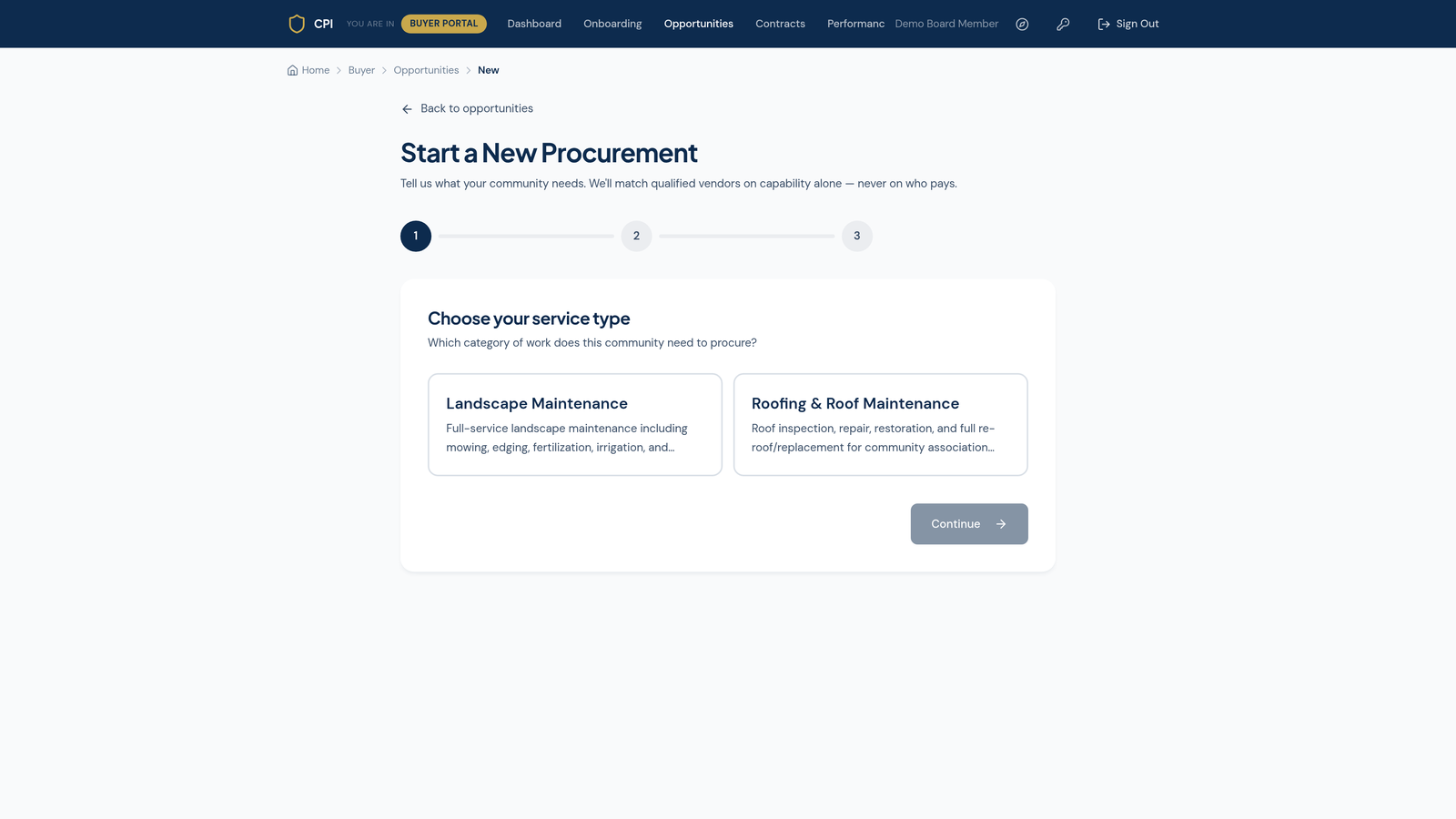
Starting a procurement begins with one plain question: what does the community need to buy? The board chooses the category — Landscape Maintenance or Roofing & Roof Maintenance — and CPI shapes the rest of the intake around that trade.

The promise is printed right on the screen, in the community’s own words: “We’ll match qualified vendors on capability alone — never on who pays.” That is not marketing copy; it is the rule the matching engine actually follows in Stage 6.

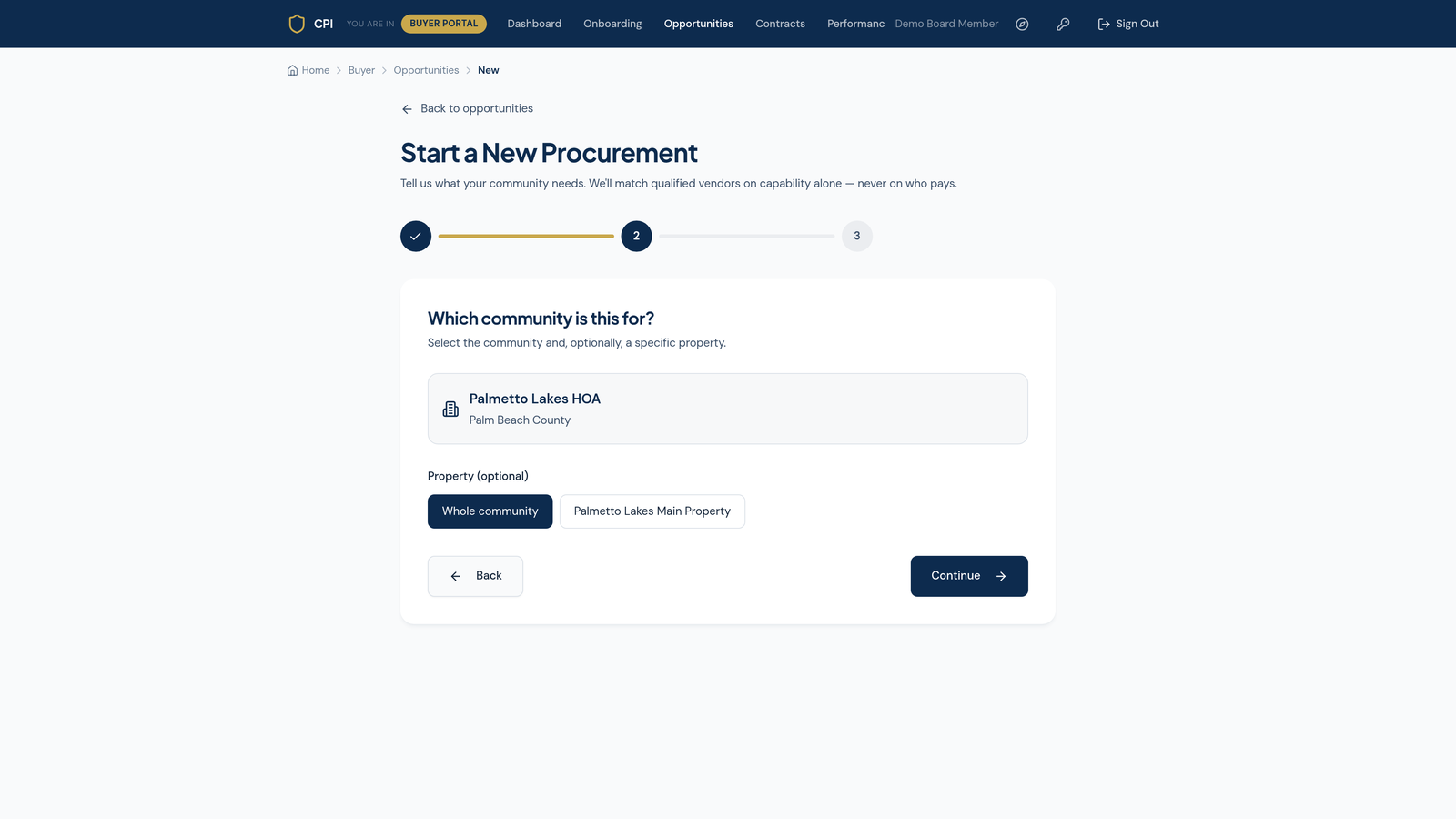
What CPI does for you. The platform already knows your association — its legal name, type, county, and unit count — so the intake starts pre-filled. The board is confirming facts, not typing them from scratch.
Start a New Procurement, step one: choose the service type, with the on-screen promise to match on capability, never on who pays.
3

Build the RFQ scope — the community’s facts

In the driver’s seat: the board or CAM · CPI prefills grounds & building facts

The scope step is where a vague “we need landscaping” becomes a precise, biddable request. CPI pulls the community’s known facts from its association profile — landscaped acreage, number of lakes, irrigation zones, tree inventory, building count, roof types — so the board is confirming, not re-keying.

The board then states the required services, any optional services, the desired frequency, the current deficiencies to fix, and the improvements it wants. That is the RFQ every qualified vendor will bid against — identical scope, so the proposals that come back are genuinely comparable.

What each vendor sees, and what stays with the board

  • Shared with invited vendors The scope of work, service frequency, and the property facts a vendor needs to price the job accurately.
  • Shared once a vendor qualifies Detailed site plans and the full deficiency list — released to vendors the engine has already matched as qualified.
  • Board only — never shown to vendors Your budget posture, internal evaluation priorities and weighting, board deliberations, and every other vendor’s pricing. Nobody bids against your number, and nobody sees a rival’s.
The RFQ scope step, with community grounds and building facts prefilled from the association profile.
4

Set the standards and the process

In the driver’s seat: the board or CAM

Before the request goes out, the board sets the bar every vendor must clear — applied equally, no exceptions. These are the insurance floors (a general-liability minimum, workers’ compensation, an additional-insured requirement) and the classification standards (worker classification, E-Verify, background checks) the community expects.

Then the board sets the process: how many bids it wants to see, the decision date it is working toward, and what it will weigh most — price, quality, responsiveness. For a large or complex scope, it can also flag that an independent Verified Assessment is needed before award.

5

The opportunity goes live — the paper trail begins

In the driver’s seat: the CPI platform

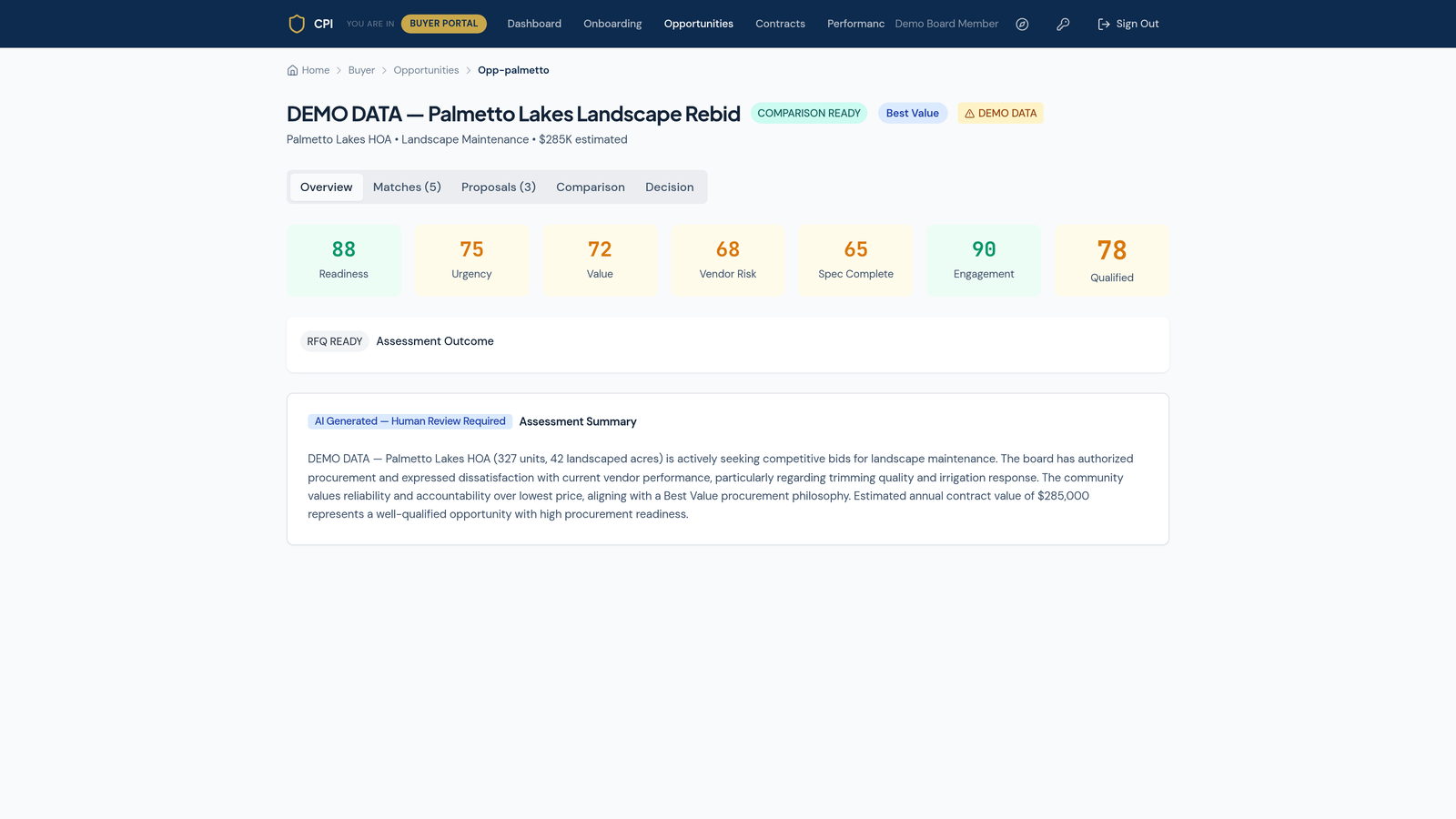
Once the board confirms, the opportunity goes live and gets its own record. From this moment every step is time-stamped: when it opened, which vendors were matched, what each proposed, how they scored, and — in the end — why the winner won.

The opportunity page organizes the whole procurement into tabs — Overview, Matches, Proposals, Comparison, and Decision — so the board always knows where things stand.

Why this matters for a high-ticket buy. A six-figure award invites second-guessing from owners, auditors, and the next board. This record is the community’s defense: a clean, neutral, time-stamped trail showing the decision was made on the merits.
The live opportunity overview page with Overview, Matches, Proposals, Comparison, and Decision tabs.
6

Qualified matches — ranked on capability alone

In the driver’s seat: the CPI matching engine

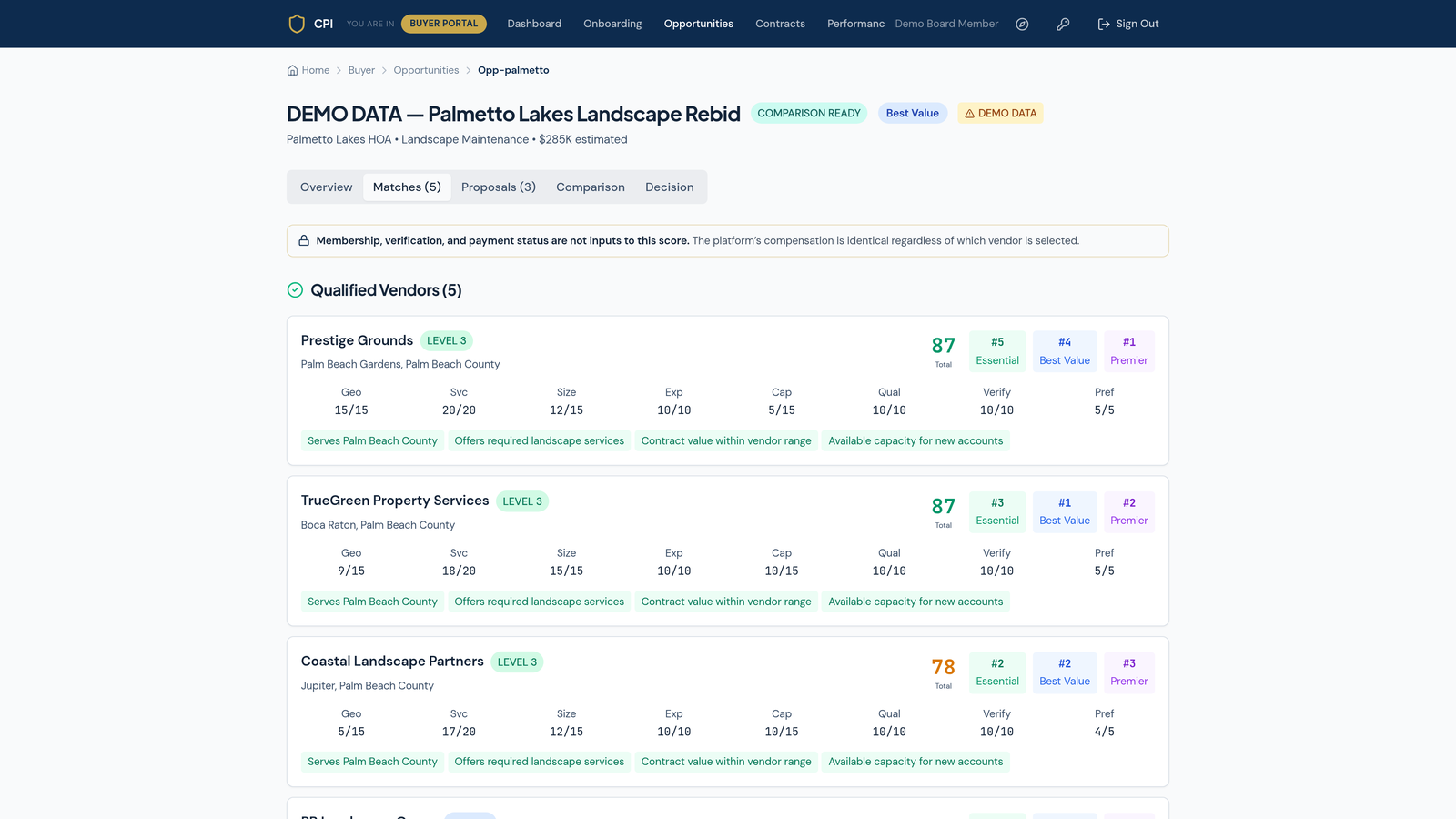
Now the engine does the work a busy board cannot. It scores every qualified vendor against the community’s actual RFQ across eight capability factors: Geography, Service fit, Size, Experience, Capacity, Qualifications, Verification, and the community’s stated Preferences.

The banner on this screen states the rule in plain words: “Membership, verification, and payment status are not inputs to this score. The platform’s compensation is identical regardless of which vendor is selected.” A Listed vendor and a Premier member are scored by the exact same yardstick.

The Matches tab: qualified vendors scored on eight capability factors, with the banner stating payment is not an input to the score.
7

Verify the sellers — proof before a high-ticket award

In the driver’s seat: the independent verifier

A high score gets a vendor onto the shortlist; proof keeps it there. Before a large award, an independent verifier confirms each shortlisted vendor’s license, current insurance certificates, workers’ compensation, and track record against the documents on file. The “Verify 10/10” only lands when those documents actually check out.

For the largest or most complex scopes — a full reroof, a multi-year grounds contract — the board can commission an independent Verified Assessment (an arm’s-length, third-party review) so the winning bid is backed by more than a proposal.

Verification is about proof, not payment. A vendor cannot buy a verified badge, and paying for one would not raise its score. Verification confirms that what a vendor claims is true — nothing more, and nothing less.
8

Apples-to-apples comparison

In the driver’s seat: the board reviews · CPI normalizes every proposal

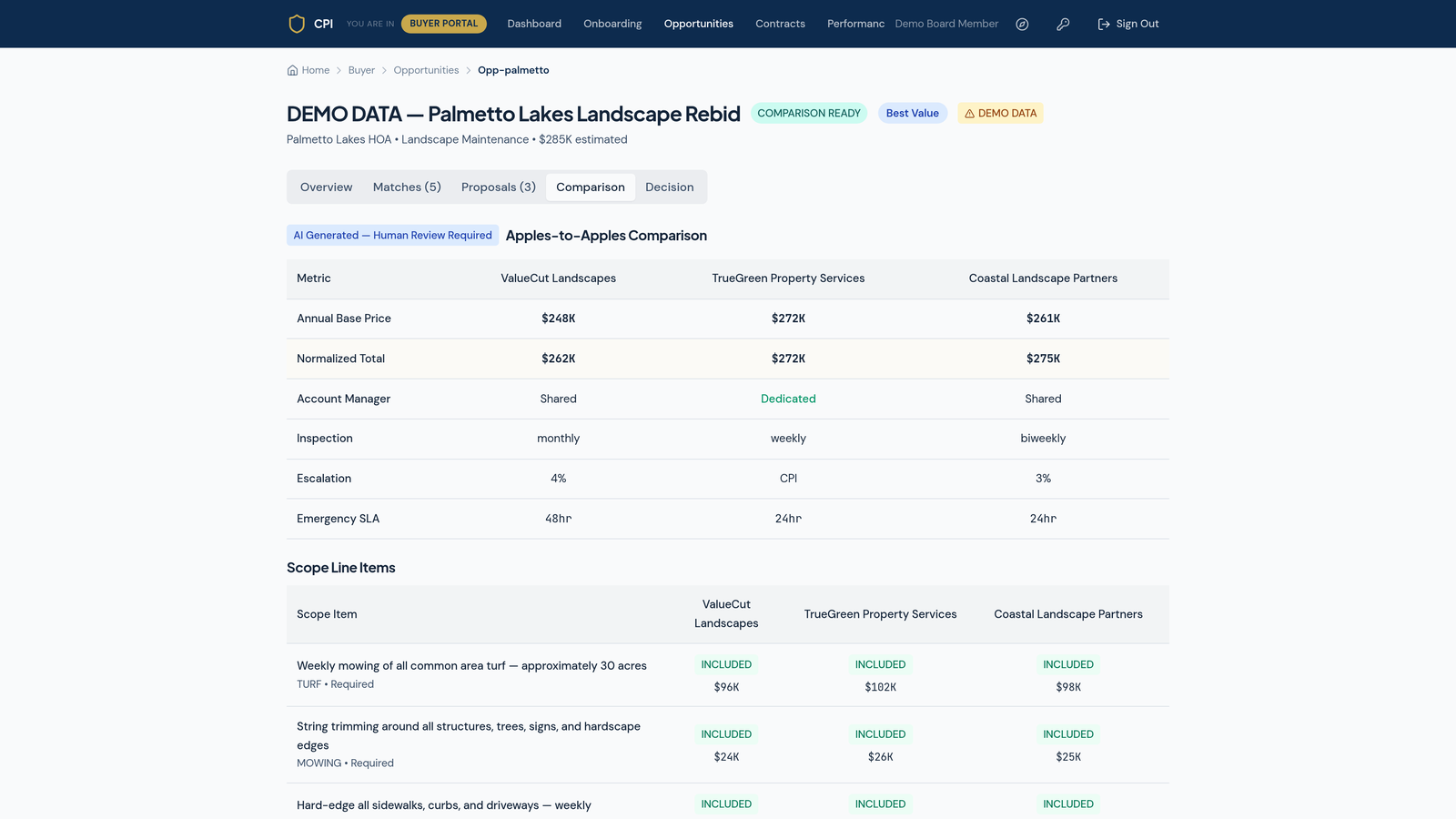
Proposals never arrive in the same shape — one bundles emergency calls, another prices them separately; one inspects weekly, another monthly. CPI normalizes them all to the community’s one scope so the numbers finally mean the same thing.

The comparison lays it out side by side: annual base price, a normalized total (so $248K and $272K are a real comparison), the account-manager model, inspection cadence, escalation, emergency response, and every scope line item marked included or not — with its price.

Honest labeling. The comparison is marked “AI Generated — Human Review Required.” CPI does the tedious normalization; the board makes the call. The tool informs the decision — it never makes it.
The Apples-to-Apples comparison matrix: normalized totals and scope line items across competing vendors.
9

Award the decision — on the record

In the driver’s seat: the board or CAM

With capability scored, credentials verified, and proposals normalized, the board records its award and the reason for it. The whole trail is preserved — who was invited, who bid, how each scored, and why the winner won.

That record is the community’s protection. When an owner asks “why did we pick them?” or an auditor reviews the file, the answer is one clean, neutral document — not a folder of emails and a fading memory.

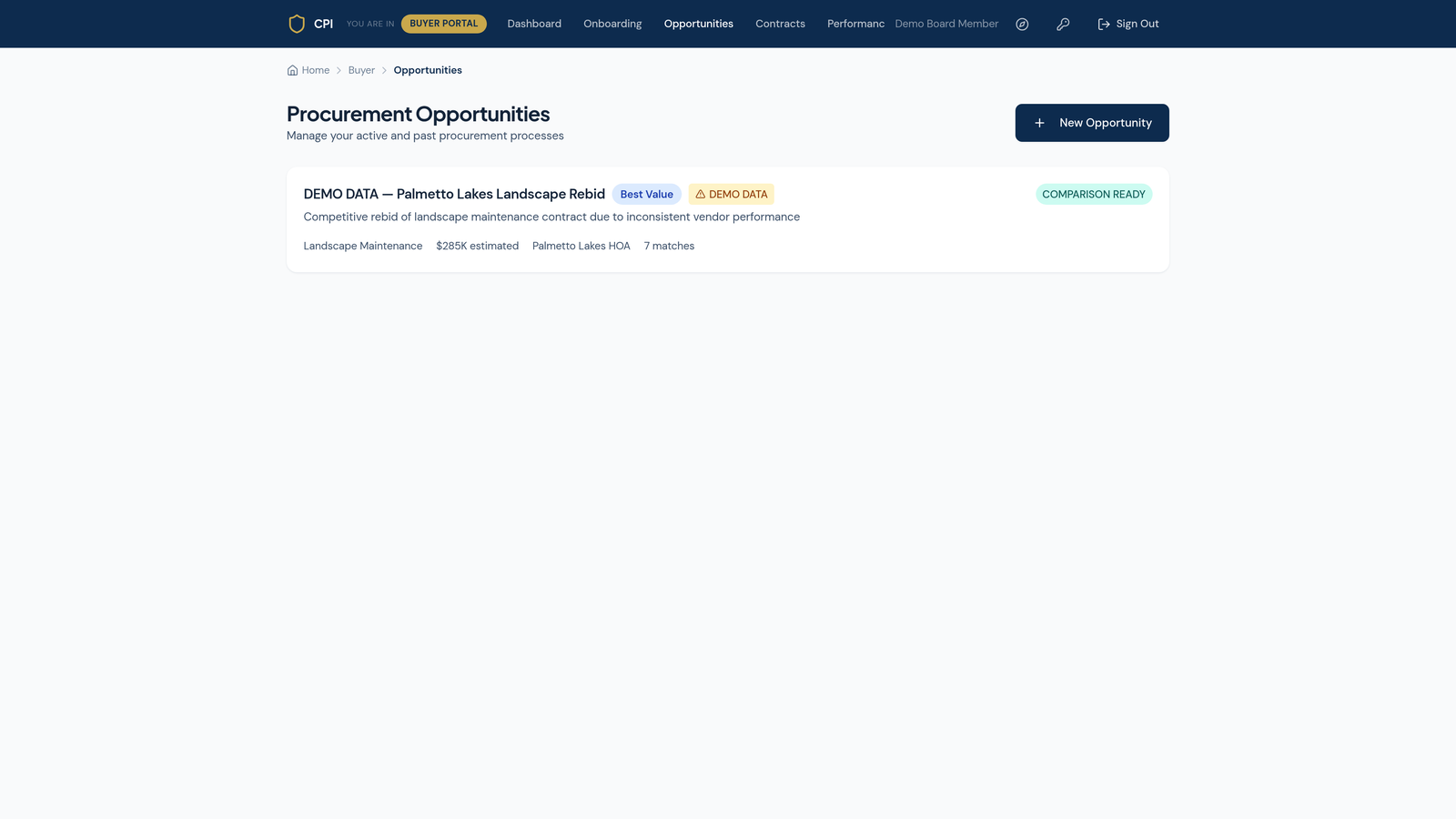
The Opportunities list showing the procurement moving to a recorded, comparison-ready decision.
10

After the award — contract and performance

In the driver’s seat: the board or CAM

The award is the start of the relationship, not the end of the work. The signed contract and its term live in Contracts, and the dashboard’s expiring-in-90-days tracker makes sure a renewal never lapses by accident.

Performance is tracked against the scope the community actually bought, so the next rebid starts from evidence, not impressions. And because the RFQ is saved, the whole request becomes a reusable template — the next procurement takes a fraction of the time.

One rule, start to finish. From the first click to the renewal reminder, the community chooses on capability and keeps the proof. Payment decides what a vendor may show — never where it ranks, and never who wins.

The itemized to-do checklist

Every obligation and action across the procurement, organized by the three working seats. Print it, check it off, and nothing gets missed.

Before the RFQ — setting it up

Board / CAM obligationsCPI prefill & Admin actionsVerifier confirms
☐Confirm the association record (legal name, type, county, unit count)☐Prefill the community profile from the association record on file—
☐Choose the service category (landscape, roofing, …)☐Shape the intake around the chosen trade—
☐Confirm grounds & building facts (acreage, lakes, irrigation, roofs)☐Prefill known property facts so nothing is re-keyed—
☐State required and optional services, frequency, deficiencies, improvements☐Assemble the scope into one biddable RFQ—
☐Set insurance floors and classification standards☐Apply the same thresholds to every vendor equally☐Note the standards that will be checked against documents
☐Set the process: bids wanted, decision date, evaluation priorities☐Record the process so the trail starts clean—

Running the RFQ — matches to comparison

Board / CAM obligationsCPI prefill & Admin actionsVerifier confirms
☐Publish the opportunity☐Open the record and begin the time-stamped trail—
☐Review qualified matches and their sub-scores☐Score every qualified vendor on the eight capability factors only—
☐Shortlist the vendors to pursue—☐Confirm license, insurance, workers’ comp, and track record from documents
☐Commission a Verified Assessment for a large or complex scope—☐Perform the independent, arm’s-length review
☐Review the apples-to-apples comparison☐Normalize every proposal to the community’s one scope—
☐Ask vendors any clarifying questions☐Keep membership and payment out of the score entirely☐Re-confirm any credential that changed

Award and after

Board / CAM obligationsCPI prefill & Admin actionsVerifier confirms
☐Record the award and the reason for it☐Preserve the full decision trail (invited, bid, scored, chosen)☐Confirm the winner’s credentials are current at award
☐Sign the contract and log its term☐Store the contract and term in Contracts—
☐Watch the expiring-in-90-days tracker☐Surface renewals before they lapse—
☐Track performance against the bought scope☐Keep the record for the next rebid—
☐Reuse the saved RFQ as a template for the next cycle☐Carry the community profile forward—

One rule, start to finish. The community chooses the most capable vendor for the job and keeps the proof of why. Payment decides what a vendor may show — never where it ranks, and never who wins. That firewall is what makes a CPI award defensible to owners, auditors, and the next board.